Offline dictation on your Mac
WalkAITalkie lives in your menu bar and turns speech into text on your Mac. Hold a key, say what you mean, let go. Speech recognition runs on the device, so once the models are downloaded you need no internet. Dictation, Raw and Clean Up are free, and there is no account.
Dictation and Clean Up are free. No account.
Requires macOS 26+ and Apple Silicon (M1 or later)
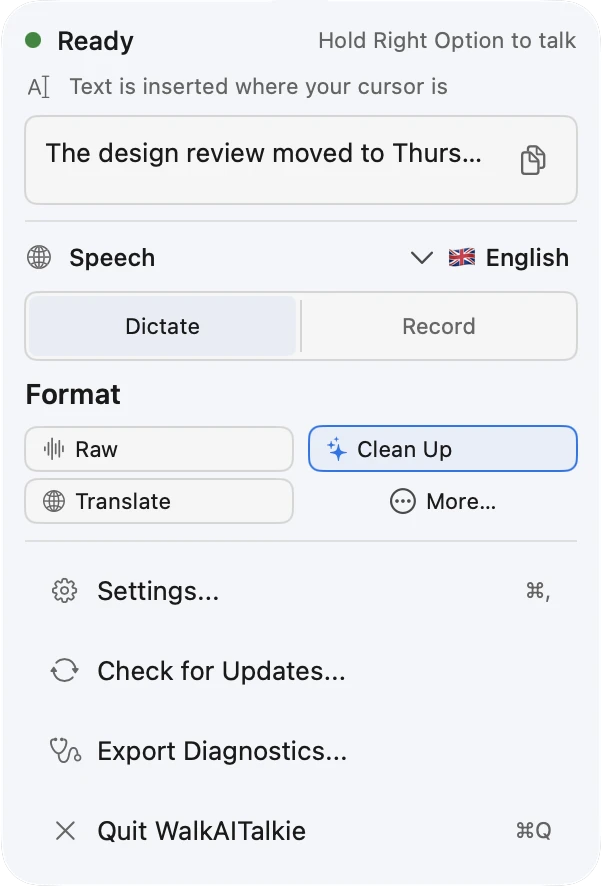
Push to talk from the menu bar
Hold the key, speak, release. Right Option is the default in the direct download, F5 in the Mac App Store version. You can choose another key, and hold-to-talk or toggle.
Speech recognition stays on your Mac
The speech model is downloaded once and then runs on your Mac. After that, dictation works offline, and your audio never leaves the Mac. Clean Up runs on a local language model too. There is one exception, and it is off until you switch it on. In the direct download with Pro, the app can hand the text to the Codex or Claude Code CLI you are signed in to. Text only, never audio.
Raw or Clean Up, both free
Clean Up removes filler words, false starts and repetitions and fixes punctuation. It keeps your wording instead of rephrasing it. Want the transcript untouched? Use Raw. Both run on your Mac after the model download.
38 dictation languages
You can dictate in 38 languages, among them English and German. The app picks the speech engine for your language, Parakeet or Whisper. This is coverage, not an accuracy rating: results vary with the language and the recording. With Pro, the finished text can be translated into 38 target languages, after transcription, not live.
The text lands where you need it
The direct download pastes the text at your cursor, in the app you are writing in. For that it needs the Accessibility permission; without it, the text goes to the clipboard. The Mac App Store version copies the text, and you paste it with ⌘V. Every dictation goes into the history, up to 200 entries, with CSV and JSON export.
What is free, what is Pro
Free
- Unlimited dictation on your Mac
- Raw and Clean Up
- History, up to 200 entries, with CSV and JSON export
- No account, no sign-up
Pro, paid once
- Translation into 38 target languages
- Email, To-do List and formats you build yourself
- Session Notes from microphone recordings
- Custom dictionary for names and terms
Pro is $7.99, paid once. No subscription, no account.
Prices and features on this page describe the direct download. In the Mac App Store, Pro is an in-app purchase. Versions, features and prices there can differ, so check the listing.
Questions about dictation
- Does dictation work without internet?
- Local dictation and cleanup work offline after the speech and language models have been downloaded. Storage needs depend on the models you choose. Downloads, purchases, updates and the optional cloud accelerator need a connection.
- Is dictation really free?
- Yes. Dictation, Raw, Clean Up and the history are free and stay free. There is no limit on the number of dictations. Pro is a one-time purchase for translation, the other formats, Session Notes and the custom dictionary.
- Can I dictate in languages other than English?
- Yes. There are 38 dictation languages, among them German, French, Spanish and Japanese, and the app itself is available in 11 languages. Speech recognition runs on your Mac, so dictation also works offline once the model for your language is downloaded.
- Do I need an account?
- No. There is no sign-up and no login. If you buy Pro in the direct download, your licence key arrives by e-mail and you paste it into the app. In the Mac App Store, Pro is an in-app purchase.
- Direct download or Mac App Store?
- The direct download can paste into the active text field, and it is the only version with the optional cloud accelerator. The Mac App Store version is sandboxed and copies the text to the clipboard for ⌘V. Both need macOS 26 or later and a Mac with Apple Silicon.
Try it on your own Mac
Download the app, hold the key and say a sentence. Dictation, Raw and Clean Up are free and stay free.